


-

 Orders & Payments
-
Placing Orders
Placing OrdersHow do I check the balance on my Gift Card or eVoucher?
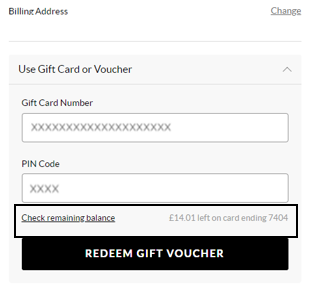
To view your balance on a Gift card or eVoucher you will need to add your items to the basket first and then once you've selected your delivery option you will be taken to the payment section. You will be presented with all the payment options available for your order. Select ‘Use Gift Card or eVoucher’ and enter your eVoucher/credit note code and pin number and then select ‘Check remaining balance’, you will then be able to see your balance.
Ați găsit acest articol util? Da Nu
Trimite feedbackContactați-neMulțumim pentru feedback-ul dumneavoastră.
Dacă doriți să sugerați îmbunătățiri pentru acest conținut, puteți împărtăși gândurile dumneavoastră, anonim, cu autorul articolului mai jos. Totuși, acest formular nu va ajunge la Serviciul Clienți și nu vom putea răspunde la întrebările trimise aici.
Dacă aveți nevoie de ajutor din partea echipei de Serviciu Clienți, vă rugăm să apăsați butonul 'Contactați-ne' în schimb.
-
Placing Orders